




DU Balance Check: Easy Ways to Check Your Balance, Data, and Validity
For those who connect to the internet via du mobile, it is easy and fast to know how much you have. The DU Balance Check is used to view your remaining credit, data, and package validity. It keeps you from any service interruptions and unexpected charges. Prepaid and Postpaid users can view their account information. The quickest way to do this is to call 135# on your DU number. SMS services or the official website are also options, as is the du App or DU’s customer service. With these official methods, you can handle your mobile account securely and conveniently.
Quick Facts
| Feature | Details |
| Telecom Provider | du (Emirates Integrated Telecommunications Company – EITC) |
| Country | United Arab Emirates (UAE) |
| Fastest Balance Check | Dial *135# |
| Internet Required | No (USSD) |
| Official Mobile App | du App |
| Online Account | Available through the du website |
| Works For | Prepaid and Postpaid customers |
| Cost | Standard balance enquiries are generally free. |
What Is DU Balance Check?
A DU Balance Check will give customers a glimpse of the key details of their account, such as:
- Remaining prepaid credit
- Available data balance
- Active package validity
- Local and international minutes.
- Mobile phone post-paid billing information.
- Active subscription and add-ons
All these details help you to recharge at the correct time, don’t overrun your data, and control your monthly mobile spending effectively.
Check DU Balance Using USSD Code

Most users find that this is the fastest and easiest way to utilize the USSD code as it requires no internet access.
Steps
- Open your phone dialer.
- Dial *135#.
- Click on Call.
- Wait a few seconds.
- Your remaining balance and related account information will be displayed on your screen.
Advantages
- Instant response
- No cell phone or data plan required.
- Works on smartphones and feature phones.
- Available 24/7
- Ideal on the go within the UAE
This is the best choice for many pre-payers, since they don’t need to rely on the internet.
Check Balance Through the Official du App
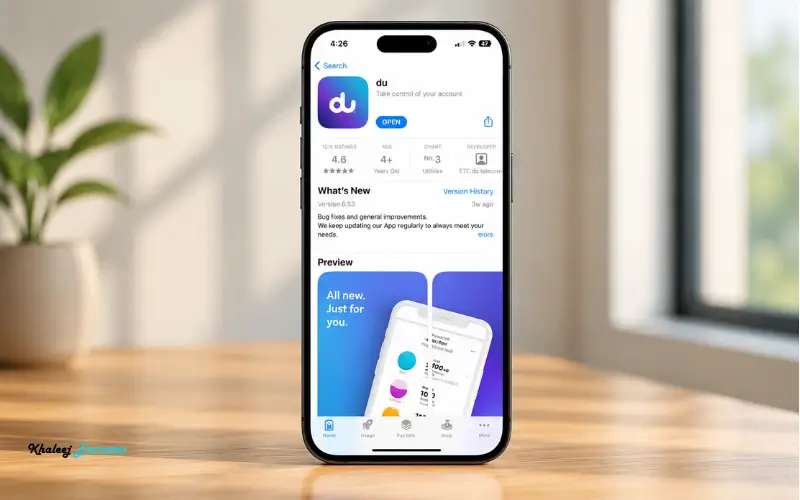
The du App provides the most detailed account information and is recommended for customers who check their usage frequently.
Once logged in, you will see:
- Remaining credit
- Data usage
- Remaining call minutes
- Current package
- Bill amount (postpaid)
- Recharge history
- Add-on subscriptions
- Roaming services
The app also enables customers to:
- Recharge instantly
- Purchase additional data
- Change mobile plans
- Pay monthly bills
- Contact customer support
- To use multiple du accounts.To control several du accounts.
As per the official app listing, Account balance and consumption will be directly present on the home screen after logging into the app.
Check DU Balance Online
Those who do not like to use a computer can access their account on the official DU self-service portal.
After logging into their account, users can view:
| Available Information | Description |
| Current balance | Remaining prepaid credit |
| Data usage | Active internet consumption |
| Package expiry | Renewal date |
| Active bundles | Data and call packages |
| Recharge history | Previous top-ups |
| Monthly bills | For postpaid customers |
The online dashboard features are particularly convenient for users who have more than one mobile number or business account.
Check Balance by SMS
Also, if you like text messages, du supplies SMS balance inquiries for specific prepaid offerings and data packages. This will come in handy when you don’t wish to use the app or access the internet. Just text the word BAL or BALANCE to 1355, and you will get your remaining balance for prepaid plans or data by SMS. Some legacy plans/services may support different keywords; please follow instructions if your plan/service is a legacy system. Official du support pages also state that for a full view of your account, you should try using the du App or call 135# instead, since SMS might only show you information for the correct plans and not about the full account.
Check Balance Through du Customer Support

You can access your account information through a DU Balance Check via USSD code, du App, or online account if you can’t do so. Once the customer’s identity has been verified, a customer care representative will be able to give you information on your remaining balance, mobile data, call minutes, package validity, current bill, and active add-ons. This is especially helpful when your balance isn’t updating, you’re having technical problems, or if you need assistance with billing or account services. There are several official channels of support, such as phone, live chat, WhatsApp, or du Stores, according to du.
Official du Customer Support Channels
- Dial 155 from any du number in the UAE.
- Dial 800 155 from another network within the UAE.
- Call +971 55 567 8155 when you are outside the UAE.
- Take advantage of the official du website and du App 24/7 Live Chat.
- Call 058 242 8268 on WhatsApp for the following customer support services:
- For face-to-face account and SIM services, visit a du Store.
Customer Support Can Help With
- Prepaid balance enquiries
- Details of postpaid bill and usage
- Unused mobile data and call minutes
- The validity and active subscription of the package.
- Payments and records of recharge
- Roaming usage and charges
- SIM activation, replacement, and account verification
By utilizing the official support channels, you will get accurate details about your account directly from du and maintain your account security.
How to Check Your Remaining Data Balance
Users often wish to know how much Internet data is left on their account, not prepaid credit.
There are a few ways to get a sense of your remaining mobile data:
Using the du App
The application displays:
- Remaining data
- Total allocated data
- Data expiry
- Daily usage
- Monthly consumption
- Use of roaming data (if any)
Using USSD
If applicable, press *135# and use the menu options to check how much internet has been used.
Using the Online Portal
The web dashboard provides detailed data usage statistics along with package renewal dates.
DU Balance Check for Prepaid Users
Regularly reviewing the balance is most important for the prepaid customer, since the credit available for calls, SMS, and mobile data used directly affects the customer.
Regular balance checking: Regular checking of your balance helps you:
- Understand how to recharge.
- Avoid interrupted calls.
- Avoid service outages.
- Monitor promotional offers.
- Keep track of package expiration dates.
The majority of prepaid users favor USSD because of the instant results without the need for an Internet connection.
DU Balance Check for Postpaid Users
Unlike prepaid customers, postpaid customers are likely to keep track of their total bill and how much credit they still have to spend on that bill rather than their prepaid credit.
Postpaid users can check their official DU App and online account portal:
- Current bill amount
- Billing cycle
- Remaining data
- Call usage
- Roaming charges
- Active subscriptions
- Payment history
These tools offer a better understanding than just a balance enquiry and allow customers to control their monthly consumption.
Common Problems During DU Balance Check
The DU balance enquiry service is reliable, but sometimes it will have problems. These can generally be solved in a short period of time.
| Problem | Possible Cause | Solution |
| USSD code not responding | Temporary network issue | Wait a few minutes and dial *135# again. |
| Incorrect balance displayed | Recent recharge or usage not updated | Allow a few minutes for the system to refresh. |
| Cannot log in to du App | Incorrect credentials or internet issue | Reset your password or check your connection. |
| Website not loading | Browser or network issue | Refresh the page or try another browser. |
| SMS enquiry not working | Unsupported keyword or service | Verify the latest SMS instructions from du’s official support. |
In case there is a problem, reach out to du Customer Care via the proper support channels.
Which DU Balance Check Method Is Best?
There are several different methods that are appropriate for different situations. The following table shows you the options that are available to you.
| Method | Internet Required | Speed | Best For |
| USSD (*135#) | No | Instant | Quick balance checks |
| du App | Yes | Fast | Detailed account management |
| Official Website | Yes | Fast | Desktop users and business accounts |
| SMS | No | Moderate | When internet is unavailable |
| Customer Support | Depends | Moderate | Account-related issues |
The USSD code is still the fastest for most users, and the du App gives the most comprehensive details of your account.
Tips to Manage Your du Account Efficiently
By monitoring your account, you can prevent any unwanted charges or disruptions. These are some of the best practices to keep in mind:
- Regularly monitor your balance, particularly before extended calls or internet use.
- If you have a prepaid connection, you can enable the recharge reminders.
- Keep track of data usage with the du App for the prevention of exceeding data limits.
- Monitor current subscriptions and cancel services that aren’t being used.
- Install the latest version of the du App to have access to the latest features and security enhancements.
- Pay off bills on time (before the due date) to avoid late fee charges.
There are some habits you can get into that will help you to better manage your mobile spending.
Is DU Balance Check Free?
Yes. The official services of DU generally allow users to call up their balances via the USSD code, without any additional charges, and also through the DU App. If you are using the app or web without a data package or Wi-Fi, however, you will be charged internet data fees.
Extra roaming fees may apply to roam outside the UAE with the use of data. Before using online account services, be sure to review your roaming plan.
Security Tips When Checking Your Balance
Personal and billing details are stored in your mobile account, and hence you need to take some basic security measures:
- Do not disclose your One-Time Password (OTP) to anyone.
- An account is only available for logging on via the official du App or the official du website.
- Don’t enter account information into third-party sites.
- Use a strong password and change it periodically.
- Log off shared or public devices.
These measures help to prevent unauthorized access to your account.
Conclusion
A DU Balance Check allows you to keep up to date on your mobile account anytime. Check your balance, data, and plan details with du services, whether you are a prepaid or post-paid user. The fastest method is to call *135#, and the du App and account online can give you detailed account information. If you regularly check your balance, you’ll know how to avoid any surprises from unexpected charges or service interruptions. Always make use of du’s official channels for accurate and secure information regarding accounts.
Must Read: ista Quick Pay: Pay Your UAE Chiller and Utility Bills Online Easily
056 Du or Etisalat? Here’s How to Identify the Network in the UAE
Hafilat Card Balance Check Abu Dhabi: Complete Guide for Bus Passengers
Frequently Asked Questions
What is the fastest way to perform a DU Balance Check?
The fastest way is to call the number 135 from your du number. The balance information is displayed on your screen within a few seconds.
Can I check my DU balance without internet?
Yes. USSD code *135# can be used on both smartphones and feature phones (non-internet mobile phones) without access to the internet.
How can I check my remaining data balance on DU?
If you have the dual data plan, you can check your remaining data via the du App, the official online account management portal, or via one of the available methods after dialing 135#.
Is the du App free to use?
Yes. The App is free to install. If you are not connected to Wi-Fi or you don’t have a data package, you may be charged a standard mobile data rate.
Can postpaid customers use the same balance check methods?
Yes. The du App, Online Portal, and Customer support allow postpaid customers to access their billing details, balance, and account usage.
Why is my balance not updating immediately?
The system may take a short time to show the recent recharges/uses. Should this continue, please call du Customer Care.
Can I check my du balance while outside the UAE?
Yes. If you have internet access, you can log in to the official du App or online account portal. Please note, roaming data charges may apply, depending on your plan.
Does checking my balance reduce my credit?
Enquiries for standard balance are not applied to any prepaid balance.
Can I manage multiple du numbers from one account?
Yes. After linking multiple eligible accounts, the official du App can be used to manage them.
Where can I find my package expiry date?
The validity of your package and the renewal date are visible in the du App and the self-service account webpage.