




ista Quick Pay: Pay Your UAE Chiller and Utility Bills Online Easily
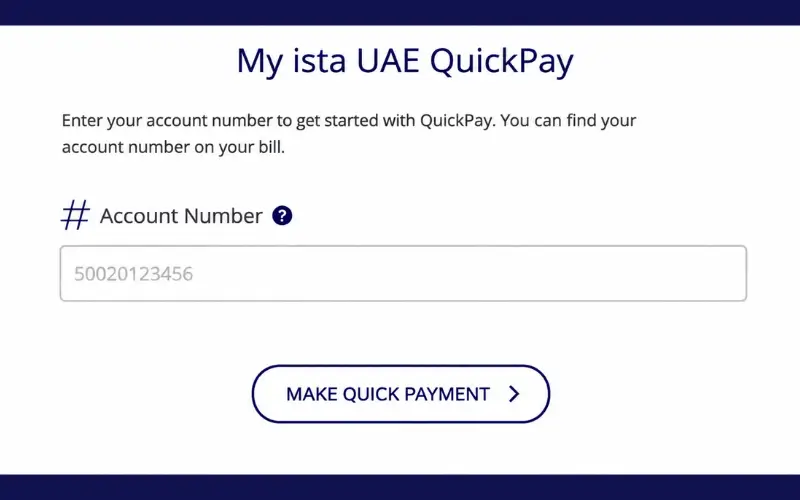
Utility bill and chiller bill payment is made easier for customers by iSTA Quick Pay. It enables consumers to pay bills online without creating an account. For customers to begin the payment procedure, they need only their iSTA account details. The service can be used to view bill details and pay bills promptly. The official iSTA payment system enables customers to pay online safely. Users can also use the MY ista UAE Portal to manage and access account details along with invoices. This convenient payment method simplifies the process of paying bills each month and saves time.
Quick Facts About ista Quick Pay
| Feature | Details |
| Service Name | ista Quick Pay |
| Purpose | Online payment of ista utility or chiller bills |
| Login Required | No login required for direct payments |
| Required Information | ista Account Number |
| Payment Methods | Credit card and debit card payments through secure gateway |
| Main Region | UAE customers using ista services |
| Related Platform | MY ista UAE Portal and App |
ista Quick Pay: How the Online Payment Service Works
The ista Quick Pay system lets individuals pay their bills quickly without having to browse a complete customer account dashboard. It is particularly effective for individuals who already have a monthly invoice and just wish to settle a balance of cash.
The process involves linking the customer’s billing details to a secure payment system. Once the user enters the account information, the platform will present the information on the mentioned property for the customer to validate that he/she is paying the correct account.
After payment details are verified, customers can choose between the different quantities and finalize their payment by using the available card payment methods.
This saves time as users don’t have to remember their password or access their full customer portal to settle their bill.
New Registration for MY ista UAE Account
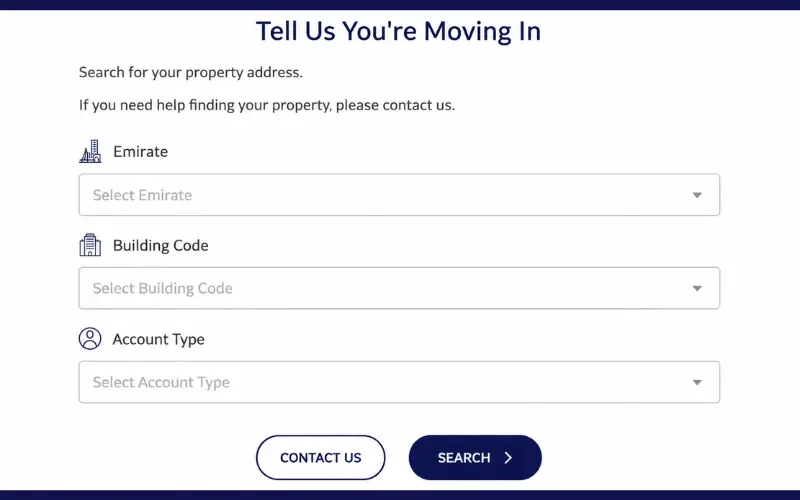
To access MY ista UAE, customers can register at the official MY ista website to help them manage their bills, check their account details, and use online services. Users need to verify their account in order to access their personal energy portal during the registration process.
Generally, customers are required to provide their ista Account Number and the last name of the registered occupant to register, and a registration code is sent via ista’s communication channels (email, SMS, or post). Once verified, users will be able to set a password and enable their online account.
Steps to Create a New MY ista UAE Account
- Log on to the official MY ista UAE Portal and click on the Register option.
- You can enter the account number on your ista bill.
- Enter the necessary verification information, such as registered information.
- Fill in the registration code as prompted.
- Make a password and finish the account activation process.
Once registered, customers can access their bills, view their energy consumption, edit account information, and pay online through the MY ista UAE Portal.
Simple Steps to Pay an ista Bill Using Quick Pay
Customers can settle their ista bill in an easy and secure manner online. They just have to enter their account number, check the details of the bill, choose the amount they would like to pay, and pay using the available payment service.
1. Open the Official ista Payment Page.
First of all, you have to go to the official ista UAE online payment service. Users should stick to official ista platforms to ensure that they don’t enter financial information on unofficial platforms.
QuickPay is not connected to the customer portal and just processes payment.
2 . Enter Your ista Account Number.
The first field that is required is the ista Account Number. This number is normally available on the monthly invoice sent by ista.
The account number should be entered carefully by the customer; otherwise, the customer’s account number may not match the one in the system, and the system will not be able to find the correct account number.
3. Verify Property Information
Once you’ve entered the account information, the system will show you the billing information that is available.
Customers are advised to verify:
- The address for the displayed property is correct.
- The account is theirs and theirs only, a home account, apartment, or office.
- The amount due is equal to their invoice.
This verification process helps avoid any possible payment to the incorrect account.
4. Select Payment Amount
With the available options, customers are able to select the amount they want to pay.
Common choices include:
- Paying off all of the outstanding debt.
- If there are payment options that are only part payment, enter the payment amount.
Users need to check the total before making payment.
5. Complete Secure Card Payment
Once the payment is confirmed, customers are taken to a secure payment page.
Online payment security is implemented during the transaction process to safeguard payment card information during checkout.
Customers should only enter their payment information into the official payment environment, and should not provide payment information to third parties.
Understanding MY ista UAE Portal and Quick Payment Difference
The direct payment option is often confused by many users with the full MY ista UAE Portal. These are two services that are linked to customer services on ista, but are used for different purposes.
The main benefit of the QuickPay service is that it is aimed at the quick settlement of bills, while the MY ista platform offers more comprehensive account management services.
| Service | Main Purpose |
| ista Quick Pay | Fast online bill payment without login |
| MY ista UAE Portal | Account management, invoices, usage information, and payment history |
| MY ista App | Mobile access to customer services |
To pay an account without doing other steps, customers can opt for the “Quick payment” feature. The full portal or app might be best for those looking for more information about their account.
Benefits of Using ista Quick Pay for Bill Payments
Digital payment platforms offer several benefits over traditional payment systems.
Faster Payment Experience
The most obvious benefit is convenience! Payment can be done without account creation or remembering login details.
This will make the process simpler if you’re paying monthly bills.
Available Anytime Online
Web-based payment solutions enable customers to pay their bills on schedule, instead of relying on actual payment facilities or office hours.
Reduced Manual Processing
Digital transactions offer a chance to cut down on paperwork and to more easily follow up on payment confirmation.
Secure Payment Environment
Official payment channels offer customers the advantage of safeguarding sensitive financial data while minimizing the potential hazards of alternative payment options.
Alternative Ways to Pay iSTA Bills in the UAE
Customers can make use of other payment options as well, while iSTA Quick Pay is a quick means of paying bills online. These are the ways that are flexible according to requirements.
For those who wish to have access to the accounts in full, they can opt for digital platforms such as the MY ista UAE portal. It assists customers in controlling their invoices and checking their account information.
The customer can choose from among different payment methods to suit his or her needs, whether to provide immediate payment or access to billing details.
Paying Through MY ista UAE Portal and App
The MY ista UAE Portal offers more account management capabilities than direct QuickPay.
Customers can generally edit things related to billing, check their billing history, and see their account status on ista’s digital platforms through their registered account.
Customers who frequently check their bills are better suited to the portal and app, as they can view their billing records.
Some useful features are:
- Accessing past invoices and payment history.
- Checking account-related information.
- Reviewing consumption/usage details (where available).
- Digital management of services to customers.
If customers have iSTA bills regularly, access to the primary portal can offer them a greater level of control over their account.
Paying Through uPay Payment Kiosks
usta customers can utilize offered uPay payment kiosks when offered.
These kiosks offer yet another alternative when customers prefer to pay by cash or card.
Customers are encouraged to check kiosk availability and payment methods before visiting, as payment services and locations at the kiosks may be subject to change.
Bank Transfer Payment Option
Alternatively, you may pay the invoice directly to the bank account listed on the official invoice.
Customers opting for this need to pay with a specific set of details, which have been detailed in their bill. The wrong transfer information can cause a delay in payment processing.
It is advisable to keep bank transfer receipts until the transaction has been confirmed.
Common Problems When Paying Ista Bills Online
Payment systems on the Internet should be simple, but at times there are problems with the payment process.
This can help users resolve the common issues easily.
Incorrect Account Number Entry
A frequent problem is the entry of the wrong account number.
Carefully copy the account number from the monthly invoice. If the digits are missing or there is a typing error, there may be no match found with the billing information in the system.
Payment Page Not Loading
There can be technical issues that are experienced by customers due to their browser settings, internet connection, or temporary service interruptions.
Possible solutions include:
- Updating the payment page.
- Browsing using another browser.
- Tapping into the Internet.
- Trying the payment once again after some time.
Payment Completed but Balance Not Updated
Following the successful transaction, the payment information will not be updated at all times.
The customer should retain the payment confirmation information and wait for the account information to be updated.
Please reach out to iSTA customer support with the transaction reference in case of any unavailability of payment after the expected processing time.
Card Payment Declined
There could be a variety of reasons why a card payment fails, such as:
- Insufficient card balance.
- Bank security restrictions.
- Incorrect card details.
- Expired card information.
If this does not resolve the issue, customers should check their card details or perhaps contact their bank.
Tips for Managing ista Utility Payments Efficiently
It can help customers to track bills monthly and avoid missed payments and unnecessary delays.
Keep Your Invoice Details Accessible
The monthly invoice contains important information such as:
- Account number.
- Billing amount.
- Payment instructions.
- Customer-related details.
Having previous invoices on hand can facilitate future payments.
Verify Details Before Payment
When confirming any transaction, always verify the property details and last payment amount.
This straightforward measure can minimize the risk of mistakes.
Use Official Payment Channels Only
Customers should not click on untrusted links in unsolicited messages or on untrusted websites.
Official iSTA platforms can help ensure protection of personal and financial information.
Why Digital Utility Payments Are Becoming More Important
Digital payment systems have transformed customers’ daily money management needs.
Older payment systems typically involved face-to-face transactions or extra processing delays. Online platforms offer a more convenient alternative, with customers completing transactions remotely.
Digital payment methods are especially beneficial for utility and cooling bills since they are typically a monthly expense.
A well-designed payment system can aid customers:
- Complete payments quickly.
- Access billing information more easily.
- Reduce paperwork.
- Have improved payment history.
The rise in online utility services is part of a wider trend towards digital customers in critical services.
Conclusion
With easy, dependable digital payment tools, customers can manage their utility bills much more easily. The iSTA Quick Pay service will allow you to make payments online without having to first log into a full account. Customers can quickly and securely complete the transactions by entering the correct account information, verifying payment information, and using the official payment channels. Users with greater needs of controlling their accounts can access more features through the MY ista UAE Portal and app, including access to the invoice and account management. The selection of the appropriate payment methods facilitates expediting the customer’s transaction procedures and optimizes the customer’s monthly utility payments.
Must Read: Hafilat Card Balance Check Abu Dhabi: Complete Guide for Bus Passengers
EVG Fine Check: How to Check and Pay UAE Traffic Fines Online (2026)
Check UAE Visa Status with Passport Number in 2026 – Step-by-Step Guide
Frequently Asked Questions
What is Insta Quick Pay?
Insta Quick Pay is an online payment method that enables ista customers to pay their utility/chiller bills without having to log into their complete customer account. The user can enter his/her account information, confirm his/her billing, and make a payment using the payment process available.
How can I pay my ista bill online?
Online payment for an ista bill is possible via the official payment service of ista, which requires you to enter a bill number, verify the data displayed about the property, choose the amount of money you wish to pay, and then complete the transaction in the manner you prefer.
Where can I find my ista account number?
Your ista account number can typically be found on your monthly ista invoice. Customers should refer to their printed or e-mailed bill for the necessary information about the account.
Do I need an ista account login to make a payment?
No. The direct payment service enables customers to make payments without having to log into the full MY ista UAE account.
Is online ista bill payment secure?
Official ista payment channels are the ones where payments are processed with secure payment processing systems. Customers are always encouraged to check that they are on a legitimate ista platform before inputting money-related information.
Can I pay only part of my ista bill?
The payment method available varies according to the settings you have on your account. If partial payments are supported, the customer might be able to enter an amount for partial payment at checkout.
What should I do if my ista payment fails?
Verify any payments by reviewing account information, card information, and internet connection. Contact ista customer support and include payment details.
How long does ista payment confirmation take?
The payment processing time may differ depending on the payment method and system updates. Customers should retain their confirmation of transaction until their payment is reflected in their account.
Can I check my ista payment history?
Users of the MY ista UAE Portal or app may access more information about their account, such as a list of available billing records and payment information (as applicable).
Which is better: ista Quick Pay or MY ista Portal?
The decision is based on the purpose. QuickPay is ideal for those who are looking to make quick payments for bills, and the MY ista UAE Portal is ideal for customers who are looking to have more account management features.