



RTA Parking SMS: Number, Format, Fees and Payment Steps in Dubai
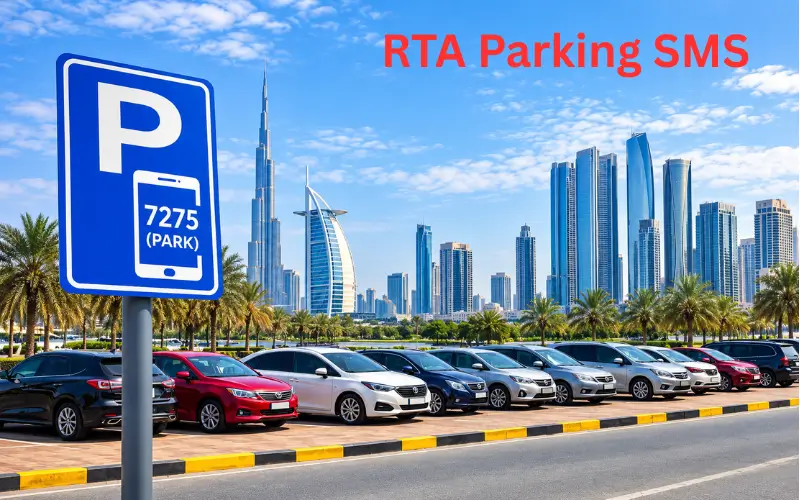
The RTA parking SMS service enables motorists to pay for eligible public parking in Dubai by simply sending a text to 7275 (PARK). It’s a useful alternative to the parking machines and the mobile apps. You can actually request your parking from your phone. The standard format for a Dubai-registered private vehicle is the vehicle plate, the parking zone code, and the duration required.
To pay, check the parking zone code from the sign nearby, enter your vehicle details and duration, and send the SMS to 7275. You’ll then have to wait for a confirmation message to confirm that your payment has been accepted and check the expiry time of the session. Knowing the correct message format, the applicable fees and parking times will help you to avoid payment errors and parking fines.
Quick Facts About RTA Parking SMS
| Detail | Information |
| Responsible authority | Roads and Transport Authority (RTA), Dubai |
| Parking SMS number | 7275 (PARK) |
| Standard message format | Plate details + zone code + duration |
| Example SMS | A12345 335A 2 |
| Example duration | 2 hours |
| Service type | Payment for eligible public parking |
| Alternative payment methods | RTA Dubai app, Parkin app, WhatsApp and parking machines |
| Official WhatsApp service | +971 58 800 9090 |
| Payment confirmation | Check the reply message before leaving the vehicle |
The example plate and zone are of course just that, illustrative. Parking charges, permitted times and service charges will of course be governed by the relevant parking rules.
What Is the RTA Parking SMS Service?
The RTA parking SMS service (often referred to as mParking) is a mobile-based payment option for eligible paid public parking in Dubai. It allows the driver to request a parking session via text message, with the payment being processed through the mobile service.
The system is useful for residents, commuters, tourists (with supported mobile access), and drivers of vehicles registered in other emirates. The message format has to be exactly correct in relation to the vehicle registration and the service requirements.
RTA also lists a number of other digital payment options, including its own app, the Parkin app, WhatsApp, and various partner services. SMS is one of the options rather than the only option.
RTA Parking SMS Number in Dubai
The official number to pay your eligible Dubai public parking fees by SMS is 7275 (which of course spells PARK on a telephone keypad).
To use it, simply open your phone’s messaging app, enter the correct parking details, and send the message to 7275. The message needs to contain your vehicle plate number, the parking zone, and the length of time you want to park for.
Don’t confuse Dubai’s parking number with the SMS numbers used in the other emirates. The parking payment systems are managed on a local basis, and the number and format will vary from city to city.
RTA Parking SMS Format
The standard format for a Dubai-registered private vehicle is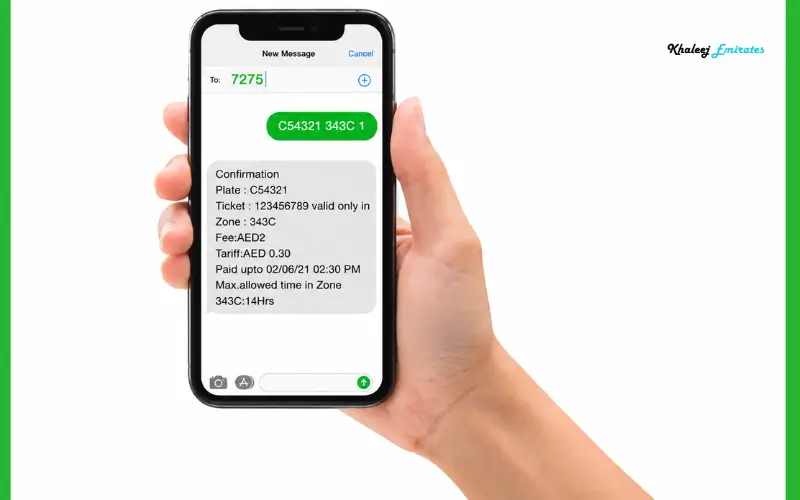
SMS MESSAGE TEMPLATE
PlateNumber ZoneCode Hours
Example: A12345 335A 2
Send to: 7275
In this example, A12345 is the plate details, 335A is the parking zone, and 2 is two hours. Use your own plate number and the code on the parking sign.
The three parts must be separated by spaces. The zone code is of particular importance, as adjacent streets or different parking categories can have different zone codes and hence different tariffs.
Understanding Each Part of the Message
Vehicle plate details: Enter the plate details in the format required for your vehicle’s registration emirate and category. A Dubai plate will be entered in a different format than a plate from another emirate.
Parking zone code: The code is on the sign adjacent to the parking bays. Copy the full code (including any letter or suffix). Don’t assume that a code which you’ve used at another location will be valid for the space you’re currently in.
Parking duration: enter the duration you require using the format that the service accepts (example 2 = 2 hours). Check the relevant zone rules prior to selecting a duration, as there are some zones where a maximum parking period applies.
RTA Parking SMS Examples
| Purpose | Example message | Meaning |
| One-hour session | A12345 335A 1 | Requests one hour |
| Two-hour session | A12345 335A 2 | Requests two hours |
| Three-hour session | A12345 335A 3 | Requests three hours |
These are just format examples, not an indication that every zone will accept every duration. Replace the dummy plate and zone with the details as shown on your actual vehicle registration and parking permit.
How to Pay for Dubai Parking by SMS
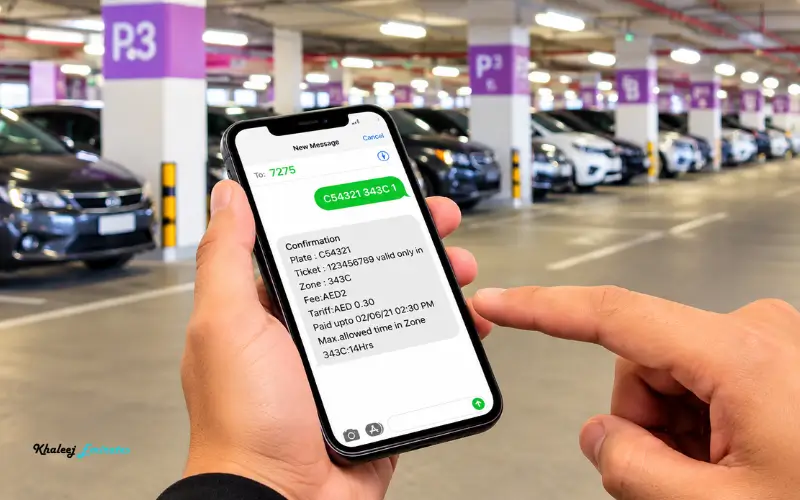
Follow these steps when using the SMS payment service.
- Find a valid paid parking space. Check the signage and markings to confirm it’s public parking and that you’re allowed to park there.
- Identify the parking zone. Read the zone code on the adjacent sign and confirm the applicable tariff, operating hours, and any maximum stay restriction.
- Open your messaging app. Start a new text message and enter your vehicle’s plate number, the zone code, and the required duration (all separated by spaces).
- Send the message to 7275. Just to be absolutely clear, double-check the recipient and the message before you send it to reduce the chance of an incorrect payment request.
- Check the reply. Wait for the service’s response to confirm that the parking transaction has gone through. If the request fails or there is no confirmation at all, then don’t assume that your parking has been paid.
- Keep the confirmation. Keep the message for reference and note the expiry time of the session. Extend the session or make a new payment as appropriate and as required.
RTA’s published parking information lists SMS as an accepted payment method. Their official channels also offer digital options should you be unable to complete your transaction by text.
RTA Parking SMS fees
The total cost of an SMS parking transaction will be the parking charge plus the SMS service charge. These are two separate charges, so the amount that appears on your mobile account may be more than the parking charge alone.
Dubai parking rates are dependent on the relevant zone, the duration of the parking, the time, and the applicable parking category. There is no one hourly rate that applies to all public parking spaces.
The RTA’s official WhatsApp parking promotion says that paying via their Mahboub WhatsApp chatbot saves you 30 fils over the standard SMS payment. That’s a difference in the service charge, not a reduction in the actual parking rate.
What Determines the Total Payment?
| Charge component | What it means |
| Parking tariff | The fee for the selected parking zone and duration |
| SMS service charge | The applicable charge for the SMS payment channel |
| Mobile billing | The transaction may be charged through a supported mobile account |
| WhatsApp alternative | RTA advertises a 30-fils saving compared with regular SMS payment |
Check the current tariff via the official RTA parking services page or the Parkin website. Don’t rely on the old parking rate tables as the rates and zone classifications can change.
RTA Parking SMS for Vehicles Registered Outside Dubai
Drivers whose cars are registered in Abu Dhabi, Sharjah, Ajman, Ras Al Khaimah, Fujairah or Umm Al Quwain should check the correct format for their registration category prior to submitting a payment request.
The general principle is still the same: get the vehicle identified, enter the zone code, and state the length of time. The plate details required by the SMS system may be different from those required for a Dubai-registered vehicle.
Don’t just take a friend’s message and substitute in their plate number. Check the current instructions for your emirate and vehicle type using the RTA’s official payment information or customer service if required. Third-party parking articles may have examples for certain plate types, but again you should go with the current official instructions.
Check Your Vehicle Registration Details
Before you pay, make sure the message is for the correct vehicle. Pay close attention to the plate codes, the registration Emirates, and any prefixes that are required by the accepted format.
If you’re someone who drives more than one car, then check the plate details each time. A successful transaction for the wrong registration may well be a non-payment for the car actually in the space.
How to Extend an RTA Parking SMS Session
If you need more time, then please check your confirmation message and the rules for your parking zone before applying for an extension.
The RTA published driver’s handbook describes an SMS reminder which will be sent around 10 minutes prior to your parking session expiring. You can extend your session by replying Y. The handbook states that the extension in that procedure is one hour at the same location. As with all service procedures, they can change, so please always follow the instructions in your current confirmation or reminder message rather than assume that all transactions work in the same way.
Steps to Extend Your Parking
- Check the reminder message and the stated expiry time.
- Confirm that an extension is permitted for your parking category and location.
- Reply with the requested extension command if the message asks you to.
- Just wait for confirmation that the extra time has been accepted.
- If the extension fails, then use another approved payment method prior to the existing session expiring where possible.
An extension should never be deemed a success just because you’ve got a reply. The updated confirmation is what you need to prove the new parking session has been established.
Pay for Dubai Parking Through WhatsApp
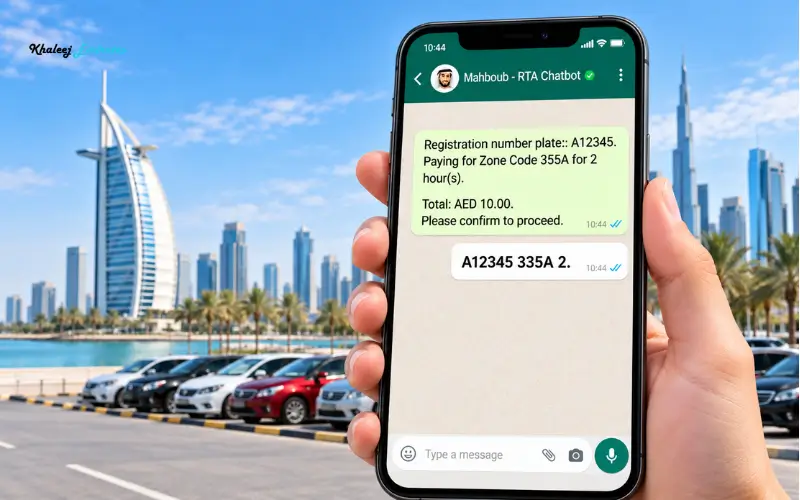
Drivers who prefer to use WhatsApp can use Mahboub (the RTA parking chatbot) on +971 58 800 9090. The RTA has this channel listed as an alternative to standard SMS payment and is promoting it as saving 30 fils over standard SMS payment.
The message follows the same basic structure used for SMS:
PlateNumber ZoneCode Duration
For example, A00000 000A 2 is the format that RTA will display. Replace that with your own vehicle and parking zone details.
To use this option, you open the official WhatsApp contact, follow the bot’s instructions, and submit the details requested. Check the response to confirm that payment has succeeded.
WhatsApp can be useful if you’re a fan of the chat interface, but it doesn’t get rid of the need to identify the correct zone or verify the transaction.
RTA Parking SMS Operating Hours and Parking Rules
SMS payment is not available at every public parking space. The rules in Dubai vary by zone and by category of parking, and some locations have specific restrictions.
Before you pay, have a look at the sign by the space and check the current rules for that area. Be mindful of the start and end of the paid parking period, the maximum permitted stay, and any special conditions.
The official UAE government website states that public parking charges and regulations will vary by emirate, by geographical location, by type of parking, and by duration. It also recommends that drivers check the parking information available at the relevant facilities.
What to Check Before Parking
- The zone code on the parking sign.
- Whether payment is due at this time.
- The relevant rate and the maximum allowable period.
- Any restrictions relating to the particular bay.
- The expiry time and status as shown in your payment confirmation.
These checks are important as paying for a session doesn’t in any way override the restrictions as to where and for how long a vehicle may park.
Why Is RTA Parking SMS Not Working?
A failed payment request can be due to incorrect message details, an unsupported format, mobile account restrictions, or a temporary issue with the service itself. The precise reason will depend on the response you get.
If the service doesn’t confirm payment, then check the message before you try again. Don’t just assume that a text has been accepted because your phone says it’s sent.
| Possible problem | What to do |
| Incorrect zone code | Recheck the sign beside your parking space |
| Missing or extra spaces | Restore the expected message format |
| Incorrect plate details | Verify the plate number and registration category |
| Insufficient mobile balance | Check your available balance or billing restrictions |
| No confirmation received | Check your messages and transaction status, then contact RTA if necessary |
| Unsupported duration | Check the zone’s permitted parking period |
| SMS service unavailable | Use another official payment method and verify the resulting confirmation |
What If You Do Not Receive a Confirmation?
First, check that you’ve got an error message or a delayed response. Check the recipient number, the plate details, the zone, and the duration.
If you can’t confirm that the payment has succeeded, then use an alternative approved payment channel and ensure that a valid session has been created. Before you make another payment request, you should check the status of the transaction where possible to avoid duplicate charges.
For help, use the contact details on the RTA’s official website. Make sure you have any error messages or transaction references to hand when you get in touch with them.
Other Ways to Pay for Public Parking in Dubai
SMS is convenient,t but it’s not the only payment option available. RTA has a range of digital and physical channels available for the payment of eligible public parking fees.
| Payment method | When it may be useful |
| RTA Dubai app | When you prefer an official mobile application |
| Parkin app | When you want to use Parkin’s parking services |
| Mahboub WhatsApp chatbot | When you prefer paying through WhatsApp |
| Parking machines | When you are near a payment machine |
| Partner services | When using an eligible service listed by RTA |
Pick the channel that is appropriate for your circumstances, but always check that the payment is for the right vehicle, the right zone, and the right duration.
For those of us who drive the same routes over and over again, it’s worth knowing the current parking rules and being familiar with the zone codes. A handy payment method is of no use if you end up paying the wrong amount.
Conclusion
The RTA parking SMS service is a very convenient way to pay for eligible public parking in Dubai without having to use a parking machine. Simply send your vehicle plate number, parking zone code, and required duration to 7275 (PARK) in the correct format. Don’t forget to check the parking sign to confirm the applicable fees, operating hours, and permitted duration.
Before you leave your vehicle, wait for the payment to confirm and check the session expiry. If you require additional parking time, follow the service’s instructions and make sure that the extension has been successful. You can also use the RTA Dubai app, the Parkin app, or the official WhatsApp service to pay for eligible parking.
Read Also: Clock Tower Sharjah: Location, History, Nearby Places & Visitor Guide
Al Nahda Park Sharjah: Timings, Location, Entry Fee & Facilities
Umm Yifenah Island: Location, Bridge, Connectivity and What to Know
Frequently Asked Questions
What is the RTA parking SMS number in Dubai?
The official number is 7275 (PARK). Send your parking details to that number and then wait for the payment confirmation.
What is the correct SMS format for Dubai parking?
Use PlateNumber ZoneCode Duration. e.g., A12345 335A 2 would be a request for two hours of parking.
How much does RTA parking SMS cost?
Total cost will depend on the parking zone, length of stay, and the applicable SMS charge. Always check the current tariff before paying.
Can I pay for Dubai parking through WhatsApp?
Yes, you can use RTA’s Mahboub WhatsApp service at +971 58 800 9090 to pay for eligible public parking.
How can I extend parking time using SMS?
Just follow the instructions in your parking reminder/confirmation message. Wait for the confirmation to be sent to be sure that the extension has been accepted.
Can I use SMS parking for a car registered in another emirate?
Yes, eligible vehicles can use the service, although the required message format will vary by registration emirate and vehicle category.
What should I do if I receive no reply to my parking SMS?
Check your message details, your zone code, and your mobile balance. If the payment isn’t confirmed, then check the transaction or use an alternative approved payment method.
Can I pay for two or more hours through SMS?
Yes, where the parking zone allows for the duration requested. Always check the zone’s maximum parking time before you send your message.
Is the parking SMS number the same across the UAE?
No, the parking payment systems are different in the Emirates. 7275 is the number used for the RTA parking SMS service in Dubai.
How do I know if my parking payment was successful?
You should receive a confirmation message showing that the transaction was accepted. Keep the message and check your parking session’s expiry time.